Time Blocks
If you want to get the most done in the least amount of time (and so have more time left to go do other things), you should use time blocks. I know, I know, that's just what the guy who sells a time-blocking app would say. But time blocking has a simple truth to it, which is something that makes sense the more you think about it. Consider these statements:
A. To lose weight, you must burn more calories than you consume.
B. When you learn something, you remember it for X amount of time before forgetting it.
These things make sense if you think about them for a second. When you accept that they are true, you can arrive at these more practical ideas:
C. To lose weight, you must exercise and/or eat less calories.
D. The most (time) efficient way to remember something long-term is to practice it right before you are about to forget it.
Likewise, there is this true idea: you get more done when you are not distracted and focus on one thing.
What is less obvious, but backed by plenty of psychology research, is just how much switching between different tasks (context switching) can cost us. You are paying a pretty high mental and temporal cost every time you stop to write an email, respond to a Teams message, or when your attention turns to the window in the corner playing Subway Surfers. There is no "multi-tasking"—just short bursts of work in between, made shorter and less effective by all the context switching.
The goal is to find chunks of time to be completely free of distractions and do deep work. Ideally blocks of multiple hours, because if the block is too short, depending on how complex the work is, you may spend most of the block just loading the context in and not actually have much time left to go deeper.
Planning deep work blocks in advance has several advantages. First, deep work is hard work, so make it a little easier on yourself by planning ahead. For example, if you can, avoid times of the day when you anticipate that your willpower will be low. Willpower correlates with blood-sugar level, so if you cannot find such a time, pack a snack that you can munch on before you do your scheduled block. Second, it removes the decision making from starting deep work, which means you have little excuse to try to rationalize your way out of it. Lastly, it forces you to actually look at the limited time budget you have and not set unrealistic goals.
It is also wise to plan blocks where you do all of the "shallow" work together. That way, you can do deep work uninterrupted and with a peace of mind, knowing that you will get to the unread emails and messages at a later designated time (or you already got through it, if you planned shallow work before deep work).
Cal Newport, a computer science professor at Georgetown University, from whom I first learned about time blocking, recommends planning your day such that every minute is accounted for. This is an ideal to strive for, but I think time blocking just the 2 kinds of work mentioned above (deep and shallow) is still immensely helpful. Cal also uses a physical notebook to plan his time blocks. I think a digital planner on my phone serves me just fine, especially when I need to make changes (certainly a more subjective take influenced by my being a seller of time block app).
Protect Your Time Blocks
Put a good amount of effort into ensuring nothing can distract you during your deep work block. Cal talks about an entrepreneur booking a round-trip flight to Tokyo to work 30,000 feet in the air without being distracted by Wi-Fi, or how J.K. Rowling would check into a suite in Balmoral Hotel to write a Harry Potter book. These are obviously extreme examples, but change of scenery (e.g. going to a library) can definitely help.
Another example of protecting your time is Brandon Sanderson explaining to his wife how important it is that he spends a specific window of time writing without being disturbed. This is smart because now his wife helps him protect his time (from obligations, other family members, etc.), and it's also generally just being a good, communicative husband.
App
I made Nichigram for myself to plan time blocks. I wanted some sort of mechanism to track whether I actually follow through with them, and so I must "check in" by taking a picture before I start working. It's more interesting than just ticking off a checkbox, and reasonably good at tracking successes/fails.
Since it knows which blocks count as successes or fails, it does a few other things:
- Tracks how much time I spend on certain tasks over week, month, year, etc.
- Tracks daily streaks
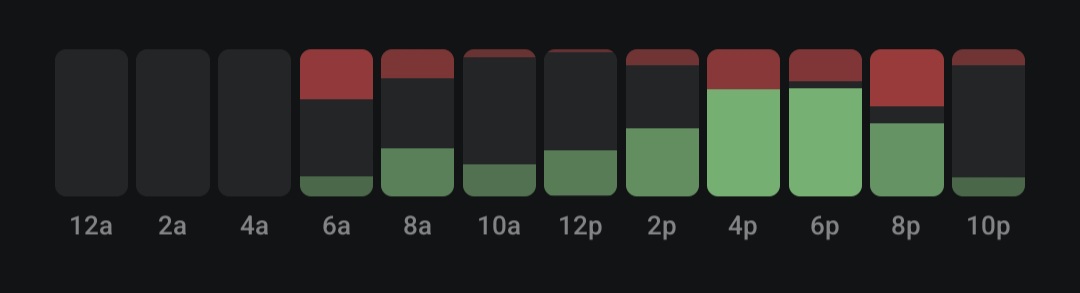
- Tracks success/fail rates of different times of the day, so I know what my "worst" and "best" times are.
Social Media and Other Distracting Apps
You probably get some value from scrolling. It can be a good way to connect with friends, discover new things or just turn off the brain for a while. The problem with social media and YouTube is that the return on time you spend diminishes SHARPLY as the session goes longer and longer. So my advice, again, is to time block social media usage. Pick a time (preferably 1 hour or less per day) where you allow yourself to scroll. In Nichigram break blocks are meant to serve this purpose. The built-in app blocker syncs with breaks you schedule, which temporarily unblocks the blocked apps.